


The Auto Workflow feature allows you to define how orders should be processed in Odoo based on their status in the e-commerce system (Shopify, Magento, WooCommerce, PrestaShop).
How Auto Workflow Works
Each time an order is imported or its status is updated with webhooks:
-
The connector reads the order status
-
It finds the corresponding Auto Workflow rule
-
Executes configured actions automatically
For each order status, you can define actions such as:
-
Confirm Sale Order → automatically confirms the quotation
-
Validate Delivery → processes delivery (stock picking)
-
Create Invoice → generates invoice
You also need to specify “Invoice Journal” to have invoiced created
-
Confirm Invoice → validates invoice
-
Register Payment → marks invoice as paid
-
Send Invoice → sends invoice to customer via Odoo emailing
You can combine multiple actions to create a full automation flow.
How to Configure
To have it configured, you need to go to Navigate to: Integration → Configuration → Auto-Workflow
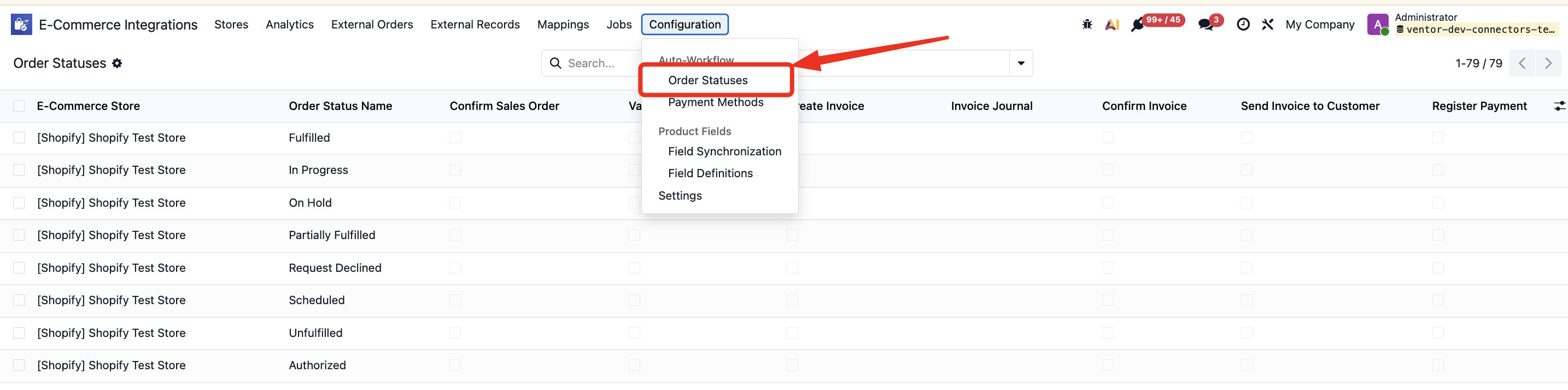
then, you can specify actions to be completed for each order status.
Example Flow for Shopify Order Status: “Paid”
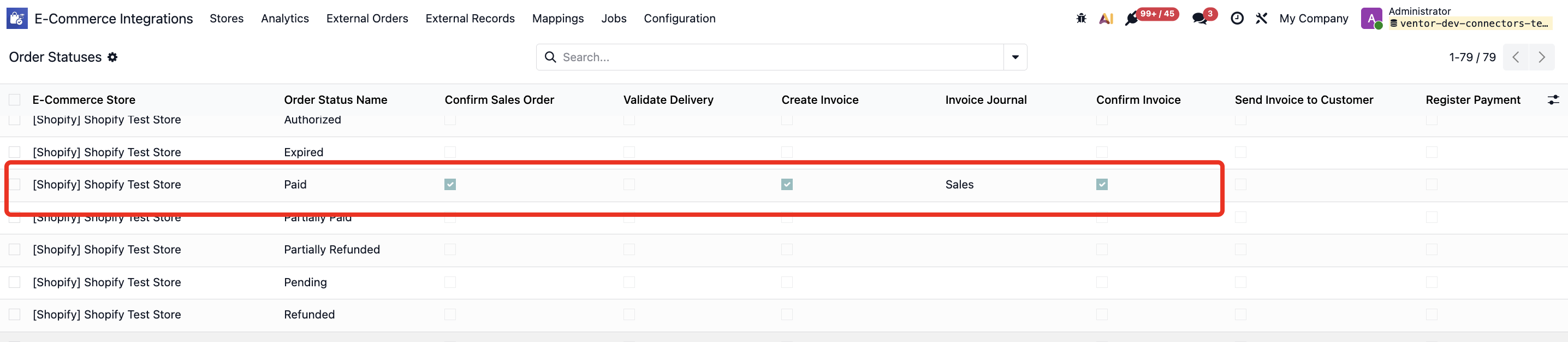
Configured workflow:
-
Confirm Sale Order
-
Validate Delivery
-
Create Invoice
-
Validate Invoice
Result: As soon as a Paid order is imported, it is imported as a “Sale Order” with created and validated Invoice.
What’s next?
See also these articles: